Why Your WordPress Site Is Slow (And How to Fix It Without 20 Plugins)
If your WordPress website feels slow, you’re not alone.
Most site owners install plugin after plugin hoping for a quick fix — but that usually makes things worse, not better.
In this guide, I’ll show you the real reasons WordPress sites become slow, and how to fix them properly without bloating your site.
🚨 The Real Problem With Slow WordPress Sites
The biggest mistake people make is thinking:
“I just need a speed plugin.”
But speed issues usually come from:
- Poor hosting
- Too many plugins
- Heavy themes (like bloated Elementor builds)
- Unoptimised images
- Excessive JavaScript and CSS
Speed plugins can help — but they don’t fix bad foundations.
⚡ 1. Your Hosting Matters More Than You Think
Cheap shared hosting is one of the biggest bottlenecks.
If your server is slow, no amount of optimisation will fully fix it.
Look for hosting that includes:
- LiteSpeed or NGINX
- Server-level caching
- Fast TTFB (Time To First Byte)
⚡ 2. Too Many Plugins = Slower Site
Every plugin adds:
- Extra database queries
- More scripts and styles
- Potential conflicts
👉 Keep only what you actually need.
A well-optimised site can run fast with 10 plugins or less.
⚡ 3. Elementor Isn’t the Problem (Bad Usage Is)
Elementor itself isn’t slow — but how you use it matters.
Common mistakes:
- Too many nested containers
- Unused sections left on the page
- Heavy widgets (sliders, animations, etc.)
👉 Keep layouts clean and minimal.
⚡ 4. Images Are Killing Your Speed
Uploading massive images straight from your phone is a common issue.
Fix it by:
- Compressing images before upload
- Using modern formats like WebP
- Keeping image sizes appropriate (no 4000px images for a 400px container)
⚡ 5. JavaScript Bloat
Themes and plugins often load scripts you don’t even use.
This increases:
- Load time
- Render blocking
- CLS issues
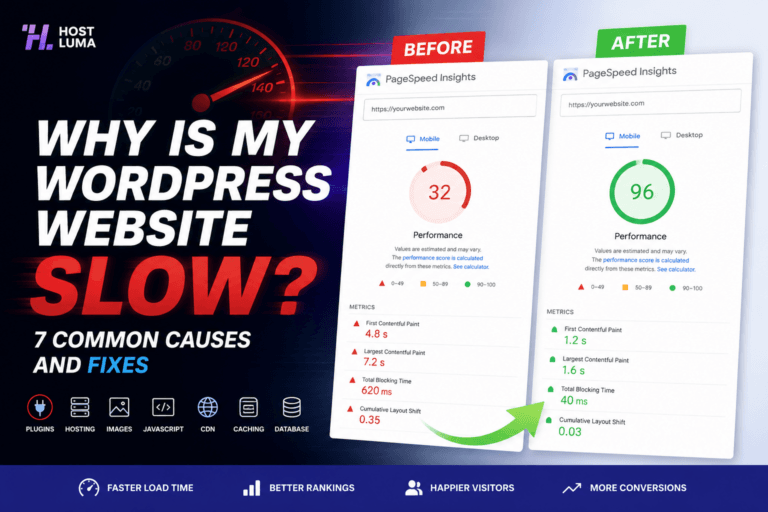
👉 Tools like PageSpeed Insights will show you exactly what’s slowing things down.
🔧 Simple Optimisation Stack (No Bloat)
You don’t need 20 plugins.
A clean setup looks like:
- LiteSpeed Cache (or similar)
- Image optimisation
- Minimal theme + Elementor
- CDN (optional but recommended)
That’s it.
📊 Test Your Site Properly
Use:
- Google PageSpeed Insights
- GTmetrix
Look at:
- Performance score
- Largest Contentful Paint (LCP)
- Total Blocking Time (TBT)
Don’t just chase 100 — focus on real-world speed.
🚀 Final Thoughts
Speed isn’t about installing more plugins.
It’s about:
- Better hosting
- Cleaner builds
- Less bloat
If you fix those, your site will be fast — properly fast.
💬 Need Help?
If your site is slow and you don’t know why, start with a full audit and fix the root cause — not just the symptoms.
Published by Host Luma – Managed WordPress Hosting & Performance Optimisation



Need Faster WordPress Hosting?
Discover fully managed WordPress hosting with LiteSpeed Enterprise, free CDN, automated backups and proactive WordPress maintenance.